

Announcements
CoinTR offers over 280 coin trading features and a commission-free trading experience! The go-to destination for professionals and beginners alike.
How To Upgrade Status

CoinTR
2025-07-25 18:26


What Is a CoinTR Status Upgrade and How Do You Apply?
A CoinTR Status Upgrade is a verification process that allows eligible users to apply for an exemption from the daily and monthly limits applicable to on-chain withdrawals of stable crypto assets.
The process is conducted in line with Travel Rule requirements. Submitting an application does not mean that it will be automatically approved.
Current CoinTR Crypto Withdrawal Limits
The following standard limits apply to on-chain withdrawals of stable crypto assets:
-
Daily withdrawal limit: USD 6,000
-
Monthly withdrawal limit: USD 100,000
Users whose Status Upgrade applications are approved are not subject to these standard limits when withdrawing stable crypto assets on-chain.
Who Can Apply for a Status Upgrade?
CoinTR Status Upgrade applications are available for the following statuses:
-
Arbitrage User: Users who trade based on price differences between platforms.
-
Market Maker: Users who contribute to liquidity by regularly placing buy and sell orders.
-
Liquidity Provider: Professional or institutional users who contribute to market depth through high-volume transactions.
Information and Documents Required for a Status Upgrade
The following information and documents are required for all Status Upgrade applications:
-
Source of funds information
-
Length of activity
-
Proof of source of funds amounting to at least TRY 260,000, shown on a bank statement covering the last 30 days
-
A screenshot showing deposit transactions made on another crypto asset platform during the last 30 days
-
A screenshot showing transaction history on another crypto asset platform for the last 90 days
Additional Documents Required by Status
-
Market Maker: A market-making agreement signed with another crypto asset platform
-
Liquidity Provider: A liquidity provider agreement signed with another crypto asset platform
How to Apply for a Status Upgrade on the CoinTR Website
-
Log in to your CoinTR account.
-
Go to the Crypto Withdrawal page.
-
Click “Start transacting instantly and increase your withdrawal limits” in the bottom-right section.
-
Select the status you wish to apply for.
-
Enter the required information, upload your documents, and submit your application.
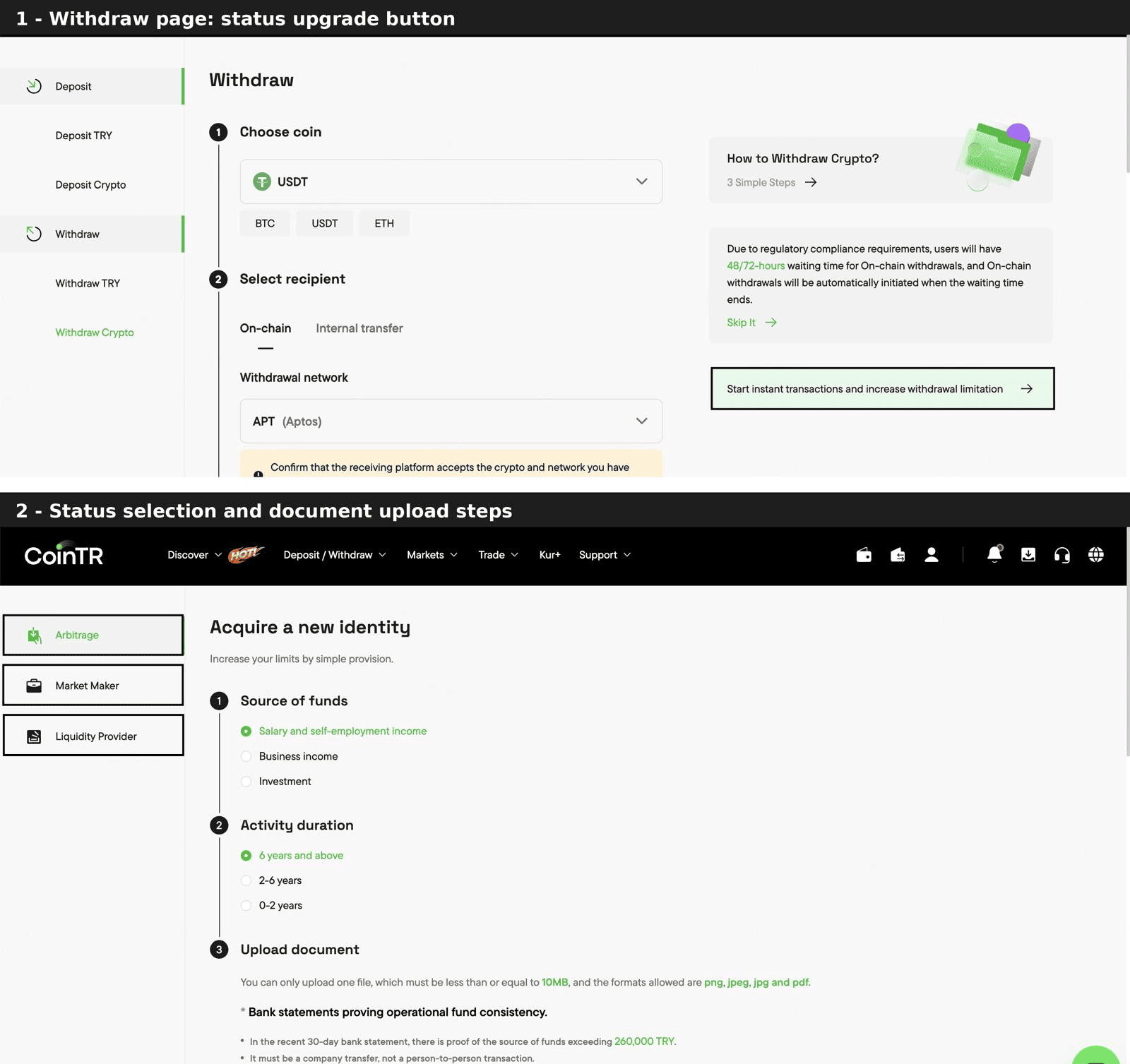
How to Apply for a Status Upgrade on the CoinTR Mobile App
Before applying, make sure you are using the latest version of the CoinTR app.
-
Log in to your account and go to the Assets page.
-
Select Crypto Withdrawal.
-
Select the crypto asset you wish to withdraw and proceed to On-chain Withdrawal.
-
Tap “Start transacting instantly and increase your withdrawal limits” at the top of the screen.
-
Select the status you wish to apply for.
-
Enter the required information, upload your documents, and submit your application.
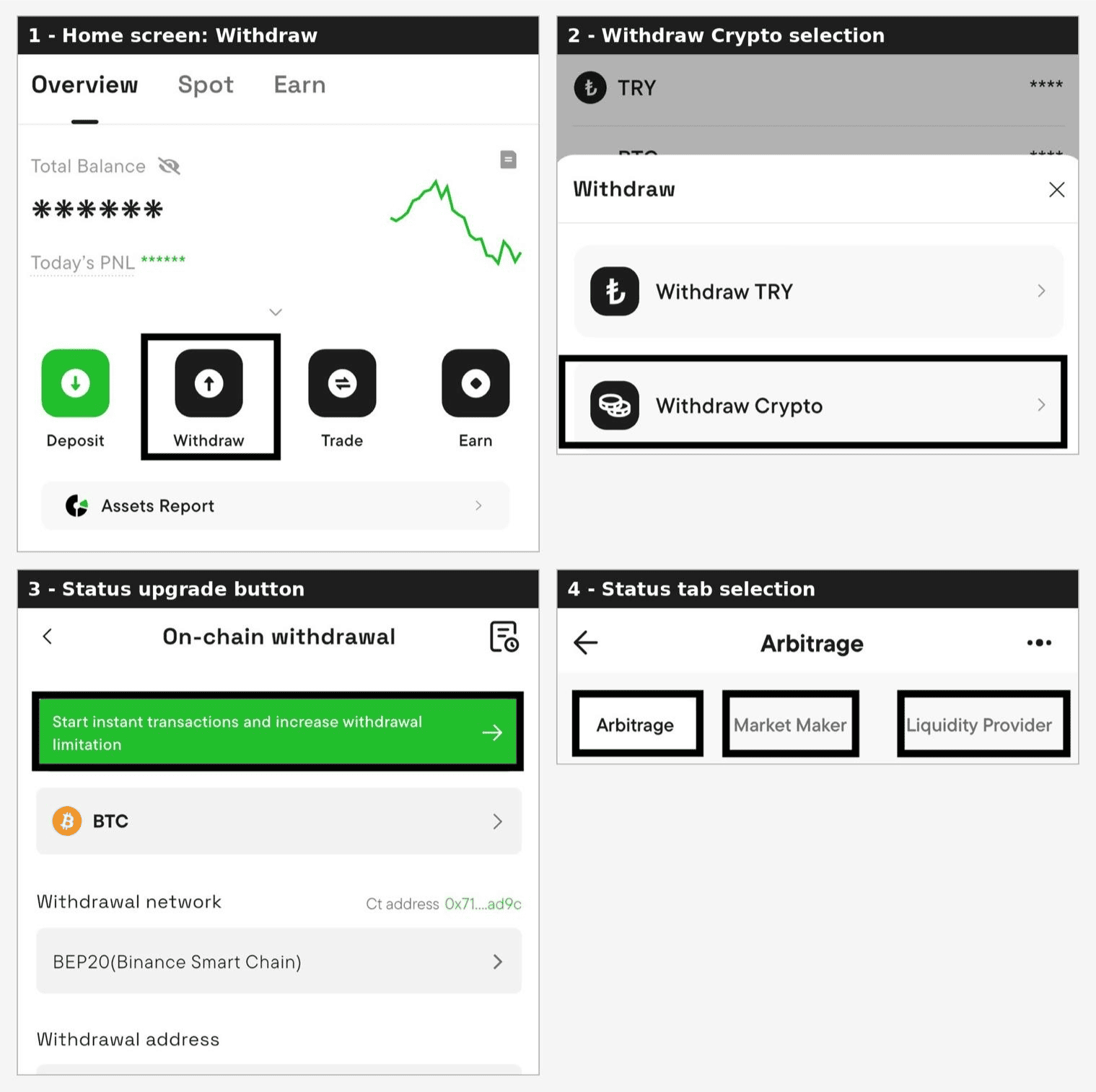
After Applying
-
Your application will be reviewed by the CoinTR Compliance Team. Additional information or documents may be requested during the review.
-
Once your application is approved, the relevant status will be assigned to your account.
-
Status Upgrade approval does not mean that all controls and assessments are removed. Transactions will continue to be evaluated in accordance with applicable regulations and CoinTR compliance policies.
-
Your application may not be approved if it is not deemed eligible by the Compliance Team following the evaluation process.
-
Application requirements and withdrawal limits may be updated in line with applicable regulations.
Legal Notice
The information, comments, and evaluations contained in this content do not constitute investment advice. This content is not intended to be prescriptive in any way and is intended to provide general information. It does not constitute investment advice. CoinTR cannot be held responsible for any transactions made based on this information or any losses that may arise.